

I write content for clients with offices in multiple regions, and part of the research routine is checking how the same keyword performs across those markets. The results can look very different depending on where the search originates: a query that surfaces B2B guides in New York might return local pages or a different mix of publishers in Singapore.
Those differences are useful content signals. They can show that searchers in one market expect a different angle, need different examples, or trust different sources. But finding the differences manually is slow, and broad SEO platforms like Semrush and Ahrefs are overkill (and expensive!) for a one-shot content-gap scan.
So I built Localized Content Lens, a lightweight Python tool that compares Google results for the same keyword across cities or countries. It stores SearchApi responses, normalizes the organic results, and produces Markdown reports and a CSV summary for analysis.
PREVIEW
In this article, I’ll walk through how I built the tool using
SearchApi
to pull localized Google results. This tutorial is perfect for a Python
beginner; you will understand how each piece of the pipeline works together
and what its key functions do. Check out the tool’s GitHub
repository.
How the tool works
Localized Content Lens answers a simple question: What does Market A see for this keyword that Market B does not?
An SEO specialist can examine the results and decide whether the difference represents a valid content gap or opportunity.
Under the hood, localized search works by sending the same query with different location and language parameters. SearchApi’s Google engine accepts values such as location, gl (country), and hl (interface language), so you can request results as if the search came from that city or country. The same keyword is run for each market, and the JSON returns localized organic results for comparison.
In practice, the tool takes two inputs (keywords and locations) and pulls Google results through SearchApi. It creates three outputs:
- Raw JSON evidence per keyword-market request
- Markdown reports (one per keyword)
- One CSV summary across the run
Repository file tree
The code is split into small modules so each task (requesting, validating, normalizing, comparing, and writing files) can be understood and tested on its own.
localized-content-lens/├── compare_markets.py # Entry point: run this to start the pipeline├── content_lens/ # Core modules│ ├── api.py # Sends SearchApi requests and handles errors safely│ ├── config.py # Loads inputs, credentials, and validates them│ ├── analysis.py # Normalizes organic results and compares domains│ ├── outputs.py # Writes raw JSON, Markdown, CSV, and manifest│ └── workflow.py # Coordinates the main collection loop├── keywords.txt # Keywords to research├── markets.json # Markets to compare├── requirements.txt # Python dependencies├── .env.example # Template for the SearchApi key├── .gitignore # Keeps credentials and generated files out of git└── market_comparison/ # Generated at runtime └── YYYYMMDD-HHMMSS/ ├── raw/ # Complete SearchApi responses per keyword-market ├── reports/ # Markdown comparison reports per keyword ├── results.csv # All normalized results in one spreadsheet └── run_manifest.json # Run summary: counts, failures, timestampsI separate the tutorial into two parts: collecting SERP data and turning it into research outputs. But before we start, let’s set up the environment.
Prerequisites
- Python 3.8 or later
- A SearchApi account and API key (free credits are available when you sign up)
- A local copy of the repository with the virtual environment activated and dependencies installed. (See the repository README for the detailed instructions.)
- A
.envfile containing yourSEARCHAPI_KEY
Part 1: Building the SearchApi data-collection workflow
Here’s the full pipeline overview from start to finish.
keywords.txt + markets.json | v Python reads inputs | v SearchApi HTTP requests | v complete raw JSON preserved | v Python normalizes results | v compare domains and rankings | +----------------------+ | | v v Markdown report CSV summaryIn this part, I’ll collect Google results through SearchApi, store the complete responses, and normalize them (extract and clean the fields into a consistent format). The output from this part is a set of raw JSON files and a cleaned dataset.
1. Configure keyword and location inputs
The first step prepares the two inputs: the keywords to research and the markets to compare them with. I keep both in separate files outside the Python code, so I can add or change them without touching the script.
Firstly, keywords.txt contains one search term per line:
best CRM for small businessAI for sales teamsaccount-based marketing softwareB2B content marketing strategycustomer onboarding best practicesSecond is markets.json which contains a list of market objects. Each has four fields:
name: a readable label used in reports and file nameslocation: the physical search location sent to SearchApigl: Google’s country parameter (See the full list)hl: Google’s interface-language parameter (see the full list)
For example, I want to compare the search results between New York, United States and Singapore, Singapore:
[ { "name": "US", "location": "New York, New York, United States", "gl": "us", "hl": "en" }, { "name": "SG", "location": "Singapore, Singapore", "gl": "sg", "hl": "en" }]Before sending anything to SearchApi, the tool validates the inputs so a malformed file does not consume credits.
load_keywords(path)strips whitespace, ignores blank lines, preserves the original order, and raises an error if no usable keywords remain.load_markets(path)parses the JSON and checks that a list has at least two markets. Every object must provide a non-emptyname,location,gl, andhl, and market names must be unique (labels such asUSandusare treated as duplicates).
2. Request and preserve localized Google results
Before the requests begin, load_api_key() checks that a SearchApi key is configured. Then collect_keyword_data() loops through the markets and calls search_api() once for each keyword-market pair. In this example, five keywords across two markets add up to 10 requests per run.
That said, only successful searches with an HTTP 200 response use credits; failed HTTP requests are not charged. In this tool, SearchApiError covers timeouts, connection errors, unsuccessful HTTP responses, and invalid JSON responses.
A simple request function looks like this:
def search_api(engine, query, api_key, location, gl, hl): response = requests.get( "https://www.searchapi.io/api/v1/search", params={ "engine": engine, "q": query, "api_key": api_key, "location": location, "gl": gl, "hl": hl, }, timeout=30, ) response.raise_for_status() return response.json()For a successful request, the tool saves the raw JSON as an evidence trail:
market_comparison/└── YYYYMMDD-HHMMSS/ └── raw/ └── best_crm_for_small_business/ ├── us.json └── sg.jsonHere, the same keyword produces two raw files: one for the US market and one for Singapore.
3. Normalize organic results into comparable fields
A raw SearchApi response contains search metadata, parameters, organic results, and other SERP features. This step selects only the organic results and converts each one into the consistent five-field structure. So records from different markets are easier to compare and export.
The normalization flow uses these functions:
get_items(data)reads and returns the response’s organic results. If that field is missing or has an incorrect shape, it returns an empty list.normalize_result(item)converts one organic result intoposition,title,link,snippet, anddomain.first_value(item, *keys)checks a list of possible field names in order and returns the first one containing data. For example, it usestitlewhen available and falls back tonamewhentitleis missing.normalize_domain(domain)trims whitespace, converts the domain to lowercase, removes a trailing dot, and strips a leading ‘www.’get_domain(link)extracts the hostname from the result URL and normalizes it to ‘example.com.’
After normalizing, one organic result from the Singapore response is as follows:
{ "position": 2, "title": "Best CRM for Small Business in 2026", "link": "https://slack.com/blog/crm/best-crm-for-small-business", "snippet": "Several tools with free tiers are useful for small businesses, such as Salesforce Starter, HubSpot CRM, and Zoho CRM.", "domain": "slack.com"}At this point, each successful response is preserved as raw JSON, and its organic results now have a consistent structure. Let’s move to the next part to build the comparison reports.
Part 2: Turning SERP data into research outputs
The second part uses that standardized data to compare domain presence and turns it into readable files for review.
4. Compare domains across locations
This step compares which domains appear across the markets. compare_domains(results_by_market) builds four views of domain presence:
domains_by_market: the unique normalized domains found in each marketpresence_by_domain: the markets in which each domain appearedunique_by_market: domains that appeared in exactly one captured marketshared_by_all: domains that appeared in every captured market
This comparison tracks domain presence, not changes in ranking position. For example, in the New York and Singapore run for best CRM for small business, slack.com appeared in both markets, while fayedigital.com appeared only in New York’s organic results and innowise.com appeared only in Singapore’s.
A domain marked as unique is a research signal. Keep in mind that it may be absent from another market because of ranking volatility, personalization, the limited result depth, or a temporary SERP change.
5. Generate the Markdown report and CSV summary
The raw JSON data preserves all evidence, but it’s difficult to review. So in this step, I create two readable outputs:
- one Markdown report per keyword compared; and
- one combined CSV file for the entire run.
At a high level, the flow looks like this:
csv_rows = []
for keyword in keywords:    # raw_results comes from the collection step in Part 1    csv_rows.extend(        build_csv_rows(            run_id,            research_date,            keyword,            raw_results,            locations,        )    )
    report = make_report(        keyword,        raw_results,        locations,        run_id=run_id,        research_date=research_date,    )    report_path.write_text(report, encoding="utf-8")
write_csv(csv_rows, run_dir / "results.csv")
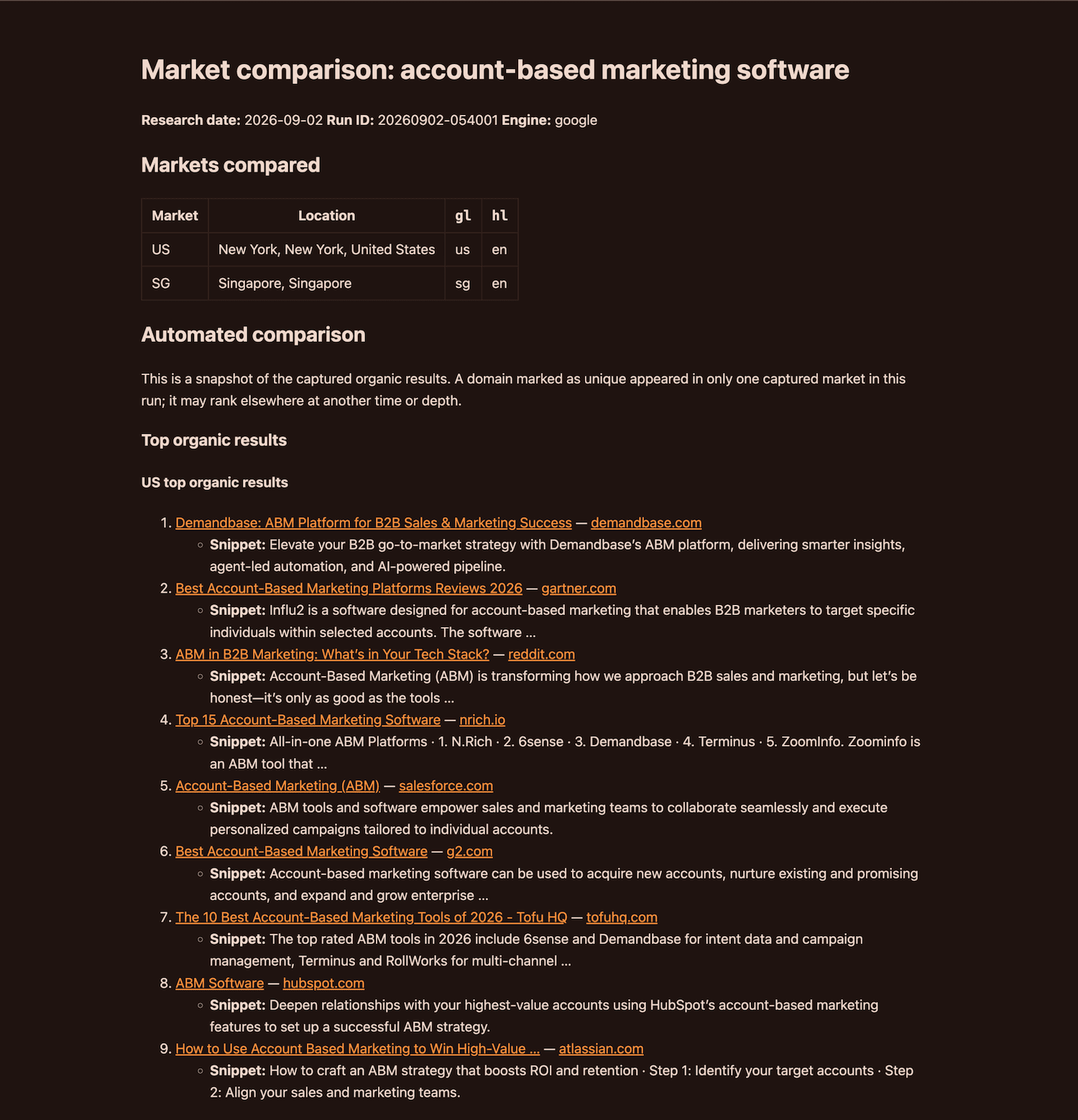
make_report() creates a markdown report for one keyword. It includes the run details, market parameters, up to 10 organic results per market, a domain-presence table, shared and unique domains, and blank fields for human analysis.
build_csv_rows() turns each organic result into one row, tagged with its keyword and market. And write_csv() writes the combined rows to results.csv.
Basically, Markdown helps me investigate one keyword at a time, while CSV gives me a sortable dataset for the full run.
6. Run the workflow
The final step ties the pieces together. I run the tool with best CRM for small business in New York and Singapore, then verify the chain:
- Loads
keywords.txtandmarkets.json. - Validates the inputs.
- Loops through each keyword and collects data for every market.
- Writes raw JSON, Markdown reports, and CSV rows.
- Writes the run manifest.
This is a simplified version of the loop:
def main():    keywords = load_keywords("keywords.txt")    locations = load_markets("markets.json")    api_key = load_api_key()
    run_paths = create_run_paths(OUTPUT_DIR, datetime.now(timezone.utc))    csv_rows = []    failures = []
    for keyword in keywords:        raw_results = collect_keyword_data(            keyword,            api_key,            locations,            raw_dir=run_paths["raw_dir"],            failures=failures,        )
        csv_rows.extend(            build_csv_rows(                run_paths["run_id"],                research_date,                keyword,                raw_results,                locations,            )        )
        if not failures:            report_path = run_paths["reports_dir"] / f"{safe_filename(keyword)}.md"            report_path.write_text(                make_report(                    keyword,                    raw_results,                    locations,                    run_id=run_paths["run_id"],                    research_date=research_date,                ),                encoding="utf-8",            )            # make_report() internally calls compare_domains(raw_results) to build the domain-presence table.
    write_csv(csv_rows, run_paths["run_dir"] / "results.csv")    write_run_manifest(run_paths["run_dir"], ...)
Here’re the files that the tool generates:
- Raw JSON files contain original SearchApi responses.
results.csvmatches the normalized fields.- The Markdown report’s domains, titles, and snippets match the raw JSON and CSV.
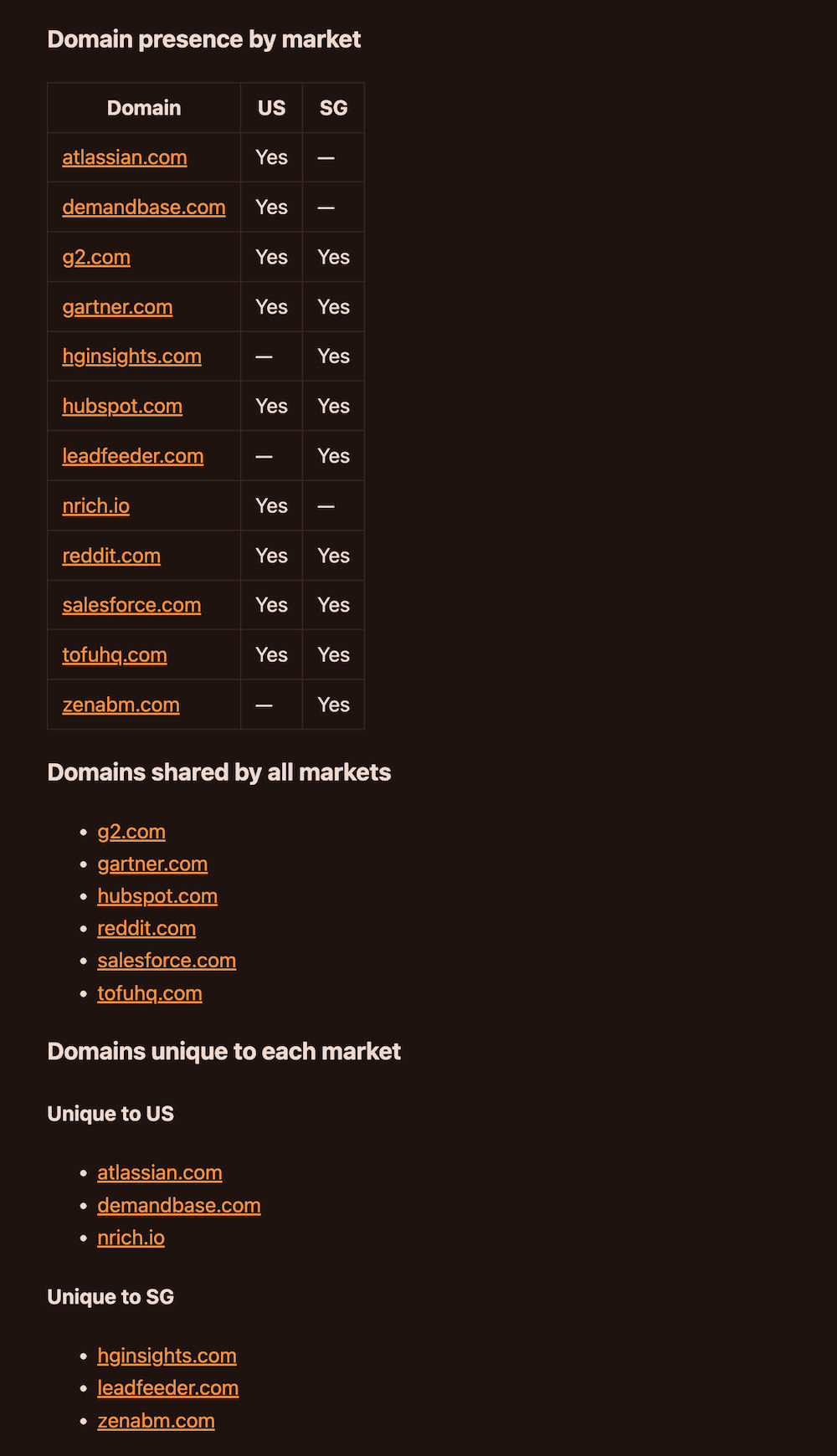
The project also has write_run_manifest() that records the run ID and ISO start time, search engine, public market fields, keyword count, attempted and completed requests, generated and skipped reports, skip reasons, and failure details. This information can be used to audit the run.
That’s how Localized Content Lens is built! The output provides a market-by-market view of what’s ranking. This allows me to spot which domains dominate a market, which keywords are likely to need localized content, and where localization efforts should be prioritized first.
Limitations and what’s next
Currently, Localized Content Lens captures a snapshot of Google organic results. It does not establish a ranking trend, explain why Google selected a page, or guarantee that publishing a localized article will improve performance. Domain differences are starting points for SEO review.
The per-keyword Markdown report is designed for two or three markets and created only if every market request runs successfully. The CSV format can contain results from more locations, but a large comparison still needs a different presentation layer.
The tool’s current version covers the core workflow. The next additions I am considering are:
google_rank_trackingsupport for up to 100 results per market- Topic clustering across titles and snippets to surface patterns faster
- A lightweight web interface for running comparisons without the command line
- Multi-language keyword input and non-English
hlsettings - Scheduled reruns and change detection for teams that need monitoring
- Comparisons across other Google surfaces such as News, Images, or Videos
NEXT
To explore or adapt the project, check out the Localized Content Lens
repository or test out
SearchApi’s free
credits.